
Grocery bills just keep going up, don’t they? Most families end up watching hundreds of dollars vanish each month thanks to wasted food, random impulse buys, and those last-minute takeout splurges. The average family loses about $1,500 a year to groceries that never even make it to the table.
But meal planning apps—especially the ones that track your pantry, send weekly deal alerts, and auto-generate shopping lists—can help you slash waste, stick to your budget, and save anywhere from $50 to $125 a month. And no, you don’t have to eat ramen every night.

Let’s talk about the apps that actually help you spend less at the store—not just the ones that look nice. You’ll see which features really matter, how pairing a planner with a deals app can boost your savings, and what kind of numbers you can realistically expect if you use these tools regularly.
If you’re tired of tossing out wilted lettuce or buying stuff you already have, this guide’s for you.
Key Takeaways
- Meal planning apps help you save by reducing food waste, cutting impulse buys, and letting you shop sales with precise ingredient lists.
- The best way to save? Use one pantry or planning app with one local deals app so you don’t miss savings on any trip.
- Look for pantry tracking, store price comparisons, recipe overlap tools, and shared shopping lists if you want to shave $50 or more off your monthly bill.
How Meal Planning Apps Help You Save on Groceries

Meal planning apps help you cut grocery costs by automating your shopping lists, tracking what you already have at home, and nudging you to use up food before it goes bad.
Automated Grocery Lists vs. Manual Shopping Lists

Apps like Mealime and Prepear pull your grocery list together automatically from the recipes you pick. You choose three dinners, and the app grabs every ingredient, then sorts it by store section.
This is a big deal. Manual lists leave holes. You forget the cumin or buy extra pasta because you can’t remember if you have any left.
Automated lists use exact quantities. If you need a cup of chicken broth for two different meals, the app does the math and puts it on your list once. So you buy a 32-ounce container instead of two random cans.
Most families save $40 to $60 a month just by sticking to these lists. No more aimless wandering through the aisles. No more “maybe I’ll need this” items that sit untouched.
Manual lists can still work, but only if you’re super organized and know your pantry like the back of your hand. Automated lists just make it easier—and honestly, who wants more guesswork?
Reducing Food Waste and Overbuying

Food waste costs most households around $1,500 a year. Meal planning apps go right after this problem by helping you plan meals you’ll actually cook and eat.
If you plan five dinners and two breakfasts, you buy ingredients for those meals. That bell pepper? It’s for Tuesday’s stir-fry. Yogurt? Breakfast with granola.
Apps like Yummly and Plan to Eat let you set portions for your family size. Cooking for two? Smaller amounts, less waste. Cooking for five? Bulk buying makes sense.
Many apps suggest ways to use leftovers, too. They’ll show you how to turn last night’s chicken into today’s soup or quesadillas. You’re not tossing half a rotisserie chicken just because you didn’t plan ahead.
Most of us overbuy when we shop hungry or without a plan. Meal planning apps give you that plan. You know what’s for dinner Thursday, so you don’t grab frozen pizza “just in case.”
Leveraging Pantry Management for Savings

Pantry tracking keeps you from buying your third jar of oregano while the first two collect dust. Apps like Paprika and Plan to Eat let you log what you already have.
Before adding something to your grocery list, the app checks your pantry. Got flour? It skips it. Running low on olive oil? It adds it.
This simple step can cut 10–15% off your grocery bill. You’re not double-buying basics or letting canned goods expire.
Pantry management works best if you update it weekly. After you unpack groceries, spend five minutes logging new items. Cross off what you used while cooking.
Some apps let you scan barcodes to speed things up. Scan it, confirm the amount, done. No need to type it all in.
Use pantry tracking to plan meals around what’s about to go bad. If you see three sweet potatoes and a bag of spinach that’s fading, search for recipes using both. The app finds ideas, and you save money while cutting waste.
Essential Money-Saving Features to Look For

The best meal planning apps help you save in three ways: they automate your shopping list to stop duplicates, track your pantry so nothing rots, and show you what you’ll spend before you even walk into the store.
Smart and Automatic Grocery Lists

Automatic grocery lists pull ingredients straight from your meal plans and sort them by aisle. No more typing “chicken breast” five times or running back for butter.
Apps like PlateJoy and Plan To Eat combine ingredients from all your recipes. If you need two eggs for Monday and six for Thursday, your list just says “8 eggs.” You’ll buy a dozen, not two small cartons.
Some lists even learn your shopping habits. They remember your favorite brand of olive oil or your go-to store. A few apps hook up with curbside pickup or grocery delivery, so you can order right from the list—no extra steps.
The savings add up fast: fewer impulse buys, no forgotten items that force a second trip, and no more buying things you already have. You can drag-and-drop meals on a meal planning calendar, and the list updates instantly. Swap Wednesday’s salmon for leftover chicken? The list changes, and you don’t overbuy.
Pantry and Inventory Tracking

Pantry inventory logs what you own so you don’t end up with five cans of tomato paste. Apps like Mealboard let you scan barcodes or add items manually, then subtract as you cook.
This saves money by cutting waste. You use what’s already there, and your meal planner suggests meals based on your pantry. Got half a bag of rice and some ground beef? The app might suggest burrito bowls instead of letting those ingredients sit.
Pantry management also helps you avoid emergency grocery runs. You’ll know you’re low on olive oil before you start cooking, not halfway through. Some apps send low-stock alerts or add staples to your list when you’re running out.
There’s a catch, though: you have to keep it updated. If you don’t log what you use, the system gets off. But even rough tracking can save $30 to $50 a month by cutting waste and double purchases.
Budgeting and Spending Controls

Budget tracking shows your grocery cost before you check out. Apps like Mealboard let you enter prices, and your list tallies up the total by store. You’ll see your meal plan costs $87 at Aldi but $112 at Whole Foods.
Some pro versions let you set weekly spending caps. If your budget is $100 and your list hits $115, you can swap expensive proteins for cheaper ones or drop a recipe. That helps you avoid sticker shock at the register.
The best apps compare unit prices and flag cheaper alternatives. If chicken thighs are $2.49 a pound and breasts are $4.99, the app suggests swapping them in your plan. Choosing thighs three times a month can save you around $15.
You can even track your spending over time. Month-to-month comparisons show if your grocery costs are creeping up or if a new meal rotation is actually saving you money. Export lists to a spreadsheet if you want to dig deeper or share the budget with your household.
See Related: Frugal Lifestyle Tips for Millennials Life-Changing Habits That Transform Your Finances
Comparing Top Meal Planning Apps for Grocery Savings

Every app here offers something different to help you save—from automatic list building to recipe databases that work with your pantry. Picking the right one depends on your shopping habits and which features you’ll actually use.
Mealime: Quick, Healthy, and Budget-Friendly Meals

Mealime lets you build your weekly meal plan in under five minutes and creates automatic grocery lists from your choices. The free version gives you a rotating set of recipes for two or four people. The premium version ($6/month) unlocks everything and lets you customize.
Mealime’s great if you’re short on time. You pick meals, and the app sorts your list by store section so you shop faster. Most recipes cost $3–$5 per serving, and you get nutrition info upfront.
But the free version gets repetitive. You’ll see the same meals cycle through, and it can get dull. If you’re cooking for one or five, you’ll have to adjust portions yourself.
Mealime works best for couples or small families who want healthy meals without spending ages planning. If you need strict diet filters or want to import your own recipes, you might want to look elsewhere.
Paprika: Recipe Organization and Pantry Tracking

Paprika costs $5 (just once) and syncs across your devices. You can save recipes from any website, organize them, and track your pantry to avoid buying things twice.
Pantry tracking actually saves money. You enter what you have, and Paprika shows you meals you can make without buying anything new. Need groceries? The app builds a list and skips items you already own.
You pay once—no subscription. The recipe clipper grabs ingredients and instructions without the ads or those endless blog stories. You can scale recipes up or down depending on your crowd.
Downsides? There’s a learning curve. Paprika won’t suggest meals or build plans for you; you have to do it yourself. It’s best for folks who want control and already have favorite recipes to organize.
Start by adding 10–15 go-to recipes, then track your pantry for a couple weeks to see where you’re doubling up.
Plan to Eat: Detailed Meal Schedules and Lists

Plan to Eat costs $5/month or $49/year and focuses on drag-and-drop scheduling. You add recipes, drag them onto a calendar, and the app makes a shopping list sorted by aisle.
The calendar shows your whole month, which helps you plan around busy weeks or set up batch cooking. Assign recipes to family members, track leftovers, and share the schedule with everyone at home.
The grocery list updates in real time as you tweak your plan. If three meals need chicken, Plan to Eat combines the amounts so you buy just what you need. You can check off items as you shop, and changes sync across devices.
There’s no free version, so you can’t test it without paying. The interface looks a little old-school, and there’s no built-in recipe database. You’ll spend some time adding your favorites or clipping from websites before it really works for you.
Plan to Eat is best for people who want total control and don’t mind a bit of setup to save money in the long run.
Cozi: Family Coordination and Meal Planning

Cozi Family Organizer comes free with ads, or you can pay $30 a year for an ad-free version with some extra perks. It pulls together a shared calendar, shopping lists, to-do lists, and a meal planner—all in one place, synced on everyone’s devices.
The meal planning section feels simple but gets the job done. You’ll add meals to a weekly calendar, attach recipes if you want, and create a shared shopping list that anyone in the family can edit. If someone adds milk to the list at home, you’ll see it right away at the store.
Cozi really shines at keeping everyone coordinated, not at providing recipes. If your family constantly asks, “What’s for dinner?” or forgets grocery items, this app fixes that headache. The shared calendar shows who’s cooking, and the recipe box keeps your favorite meals in one searchable spot.
The free version runs ads at the bottom of every screen, which honestly gets old fast. The meal planner won’t suggest recipes or track costs, so you’ll have to hunt for budget-friendly meals yourself. There’s also no pantry tracking or automatic meal generation like you find in some other apps.
Pick Cozi if you want a central place for family schedules, and meal planning is just one piece of your organization puzzle. For grocery savings, try pairing it with a recipe source that focuses on affordable meals.
Honorable Mentions: Budget-Friendly and Specialty Apps

Some apps fill specific gaps in meal planning that can lead to real grocery savings. If you’re dealing with leftovers, want to try new cuisines on a budget, or need to manage health goals, these might be worth a look.
Yummly: Personalized Recommendations

Yummly builds a taste profile based on your dietary preferences, ingredient likes, and how confident you are in the kitchen. It learns what you enjoy and suggests meals that fit your pantry and budget constraints.
You can filter by prep time, ingredient count, and cuisine, which helps when you’re trying to stretch a grocery budget without eating the same five dinners every week. The app pulls recipes from all over the web and organizes them in collections for later. Got leftover chicken thighs or a bag of lentils? Yummly’s search will show you quick recipes using what you already have.
The free version gives you access to thousands of recipes and basic grocery lists. If you want nutritional tracking and advanced planning tools, the premium tier is $4.99 a month, but honestly, most families find the free version is enough for weekly meal prep. Yummly works best if you like experimenting with new dishes, not following strict meal plans.
BigOven: Reducing Waste With Leftovers

BigOven’s “Use Up Leftovers” feature makes it a must-have for frugal cooks. Just type in three random ingredients from your fridge—maybe “ground beef, rice, bell peppers”—and the app shows you dozens of recipes so nothing goes to waste.
You can log what’s in your pantry, and BigOven will prioritize recipes using those items first. That means you’ll buy fewer duplicates and avoid tossing forgotten groceries. Over a month, this approach can save you $30 to $50 by cutting waste and impulse buys.
BigOven lets you import recipes from your favorite blogs, store them in custom folders, and create grocery lists automatically. The free version covers recipe search and basic pantry tracking. If you pay $2.99 a month, you’ll get rid of ads and unlock menu planning.
PlateJoy: Wellness and Budget Customization

PlateJoy builds personalized meal plans around your health goals, family size, and grocery budget range. You tell it how much you want to spend each week, and the app creates menus that stay within that number while still meeting nutritional targets.
This really helps if you’re trying to eat healthier without blowing your budget. PlateJoy will swap expensive proteins for cheaper ones, suggest seasonal produce, and adjust portion sizes as needed. A family of four can set a $120 weekly grocery budget, and PlateJoy will design five dinners that hit your macros without going over.
It syncs with Instacart and Amazon Fresh for direct ordering. PlateJoy costs $12.99 a month or $69 a year, which seems steep until you realize how much food waste and impulse spending it helps you avoid. It’s best for families balancing health and budget.
AnyList and MealBoard: Custom Lists and Pantry Management
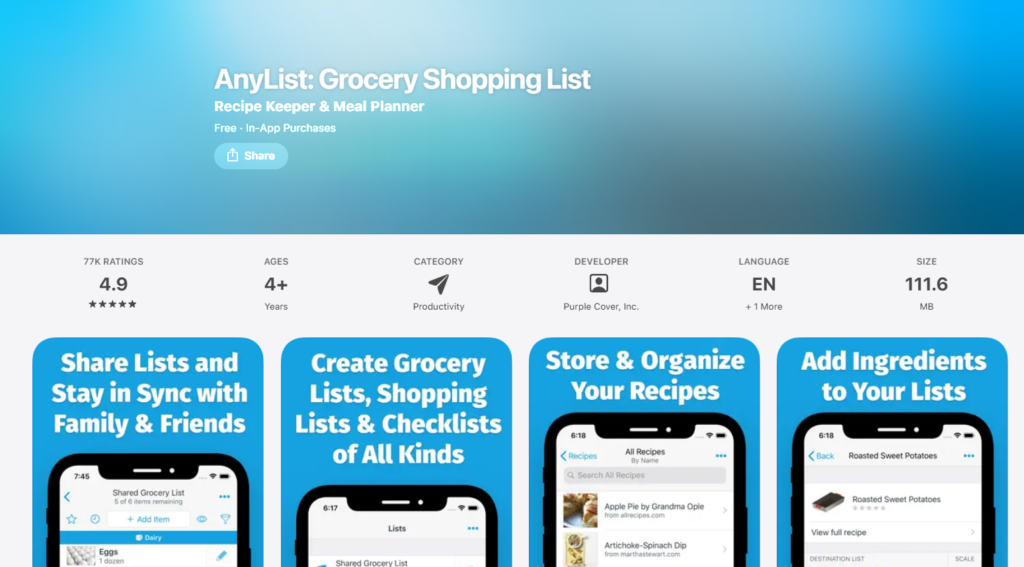
AnyList centers on shared grocery lists and recipe storage. You can import recipes from any site, tag them by meal or season, and add ingredients to your shopping list with one tap. The app sorts items by grocery aisle, making shopping way faster and helping you avoid forgetting things.
Collaboration is where AnyList shines. Your partner can add items from work, you check them off in real time, and nobody ends up with extra milk.
The free version does most of what you need. If you want recipe scaling and a meal calendar, premium is $12.99 a year.
MealBoard combines a recipe manager, meal planner, and pantry tracker in one. You log pantry items with expiration dates, and the app alerts you when things are about to go bad. That helps you avoid tossing $15 worth of wilted veggies or expired yogurt every week.
MealBoard costs $3.99 as a one-time purchase—no subscriptions. It’s great if you want full control over meal planning without monthly fees or unwanted AI suggestions.
See Related: Minimalist Frugal Living Strategies Habits to Achieve Freedom and Joy
Integrations and Delivery Options for Extra Savings

Connecting meal planning apps to grocery services can cut impulse purchases and save 10–20 minutes per trip. But not all integrations actually lower your bill. You’ll want apps that send lists directly to pickup or delivery platforms you already use.
Linking With Grocery Delivery Services

eMeals connects right to Walmart grocery delivery, Instacart, and Amazon Fresh, sending your weekly meal plan shopping list straight to checkout. This is huge because you skip the aisles where most impulse buys happen. When you use eMeals with Walmart, you get everyday prices—not third-party markups—and can use your Walmart+ benefits.
Instacart works with several meal planners like Prepear and some AnyList features. Build your list in the app, tap “send to Instacart,” and your cart gets filled automatically. But Instacart adds service fees ($3.99–$9.99) and often marks up item prices, so always check your final total against in-store prices before assuming you’re saving.
Amazon Fresh links to some third-party meal apps via recipe imports, but the easiest way is to use Amazon’s shopping list with a planner like MealPrepPro. If you already have Prime, Fresh delivery is free on orders over $100 in eligible areas, which is handy for bulk pantry restocks.
Families using integrated delivery say they save 15–25% on impulse buys, but delivery fees and markups can eat 5–12% of that. You’ll come out ahead if you stick to your list and avoid premium delivery windows.
Curbside Pickup and Store Integrations

Curbside pickup at Walmart, Target, Kroger, and similar stores usually has no extra fees and uses in-store prices. Apps like eMeals and Automatic Meal Planner can send your list straight to Walmart or Kroger for pickup, so you avoid temptations in the aisles and pay shelf price. This is often the best deal for most people.
Prepear syncs lists to Walmart and Instacart pickup, and you can switch between delivery and curbside week by week. If your store offers free pickup with a $35 minimum, you get the convenience of delivery without the extra cost.
The real win is behavioral. When you can’t wander the snack aisle or grab a “quick” rotisserie chicken you didn’t plan for, your cart total drops. One family saved $43 in the first month just by switching from in-store trips to curbside, even though they bought the same stuff.
Check if your store’s app accepts imported lists or if you’ll have to enter things manually. Manual entry takes 10–15 minutes and makes it easier to forget or add unplanned extras, which defeats the purpose. Stick with apps that offer one-tap list transfers.
Tips for Getting the Most From Meal Planning Apps

Most meal planning apps include pantry tracking, dietary filters, and shared lists. But only households that actually use these features save 20–30% more on groceries than people who just browse recipes.
Using Pantry Inventory Before Shopping

Check your pantry before planning meals or adding items to your shopping list. Apps like Cooklist and AnyList help you track what you already own, so you stop buying duplicate jars of pasta sauce or cans of beans that just expire.
Enter items as you unpack groceries or scan barcodes once a week. It takes about 10 minutes and saves you from throwing out unused food. The USDA says families waste about $1,500 a year on groceries they never eat.
Plan your weekly meals around what you already have. If you’ve got half a bag of rice, chicken thighs in the freezer, and bell peppers that need to be used, search for recipes using those three. Most apps let you filter by ingredient.
Set up a “use first” section in your app or fridge. Mark items that expire within a week and pick recipes that use them. This small habit can shave $10–$20 off your weekly grocery bill because you’re not replacing what spoils.
Meal Planning for Dietary Needs and Preferences

Choose your dietary preferences during app setup so recipe suggestions match what your family will actually eat. Most apps let you filter for vegetarian, gluten-free, dairy-free, low-carb, or allergy-friendly meals.
Apps like Mealime and eMeals have specific meal prep plans for busy families who cook once and eat leftovers all week. Pick a plan that fits your real schedule instead of forcing six new recipes when you only cook three nights.
If you’re tracking calories, sodium, or macros, use nutrition tracking. Some apps show nutrition per serving so you can compare before you commit to a recipe. This is important if you’re managing diabetes, high blood pressure, or watching your weight.
Save recipes your family actually likes into a favorites list. After a month, you’ll have 10–15 go-to dinners you can rotate, so you avoid decision fatigue and the kids don’t complain about “weird new food.”
Adjust serving sizes when you add recipes so your shopping list matches your actual portions. If you’re cooking for two but the recipe serves six, scale it down or you’ll end up wasting food.
Sharing Grocery Lists With Family Members

Connect your meal planning app to your partner’s or teen’s phone so everyone sees the same shared shopping lists. Apps like AnyList and Cooklist sync in real time.
Assign tasks in the app. One person plans meals, someone else picks up groceries, and another does meal prep on Sunday. This splits the mental load and keeps everyone in the loop.
Add to the list as you run out of things during the week. If your spouse uses the last egg, they tap the app, and eggs show up on the shared list instantly. No more “I thought you were grabbing that” moments at dinner.
Use notes or tags to mark store aisles, coupon items, or sale prices. Write “Flipp—chicken $2.99/lb at Kroger” next to chicken breasts so whoever shops knows to grab the deal. This trick can save $15–$30 per trip when several people shop from the same list.
Check off items as you shop so your partner doesn’t buy duplicates if they stop at another store. Real-time updates stop you from ending up with two gallons of milk or three boxes of pasta by accident.
See Related: Frugal Meal Ideas: Dinner Recipes on a Small Budget
Frequently Asked Questions

People often wonder which apps actually save money instead of just looking nice, how free versions compare to paid subscriptions, and whether these tools fit specific diets or family setups.
What are the top-rated meal planning apps that help with cost-effective grocery shopping?
Cooklist sits near the top for pantry tracking and price comparison across stores. You can build meals using ingredients you already have, which just feels smart. Flipp shines when it comes to pulling together weekly flyers and digital coupons from hundreds of retailers. If you actually match your list to sales, you could see 10–30% savings on basics.
Mealime keeps weeknight planning simple. It gives you recipes that share ingredients, so you’ll waste less and dodge those last-minute impulse buys.
AnyList feels handy for shared lists and lets you enter prices manually, so you’ll see a running total as you shop. eMeals appeals to busy families who want meal plans sent right to Walmart or Instacart for pickup, skipping the temptation to wander the aisles. Each app targets a different pain point: waste, deals, speed, budget tracking, or just plain convenience. Your best pick depends on which of those hits your wallet the hardest.
If you pair a planner like Mealime or Cooklist with Flipp for deals, you’ll cover both planning and bargain hunting in one go.
Can you recommend any free meal planning apps that include a budget-friendly grocery list feature?
Flipp is free and blends weekly flyers with a shopping list. You can clip digital coupons to it, making sale planning easy. Mealime’s free tier builds simple meal plans and generates shopping lists, though the Pro version ($2.99/month) adds dietary filters and lets you save plans.
Cooklist’s free version syncs some loyalty cards and builds a pantry inventory automatically. Premium features unlock better price comparison, but you can get by without them.
AnyList’s free version handles shared lists and recipe imports. The Complete plan ($9.99/year individual, $14.99/year household) adds recipe scaling and better organization. Even without paying, these apps help you avoid impulse buys by sticking to a list and showing what’s already at home.
Free tiers usually mean fewer stores, smaller recipe collections, or more manual entry. But if you’re willing to spend five extra minutes checking flyers or scanning barcodes, you can find real savings without paying a subscription.
How can a meal planning app assist me in saving money at the grocery store while ensuring a balanced diet?
Apps like Mealime and eMeals build plans around simple, whole-food recipes. You’ll naturally get proteins, veggies, and grains throughout the week. Following a structured plan means you buy intentional ingredients instead of tossing random snacks and convenience foods into your cart. That alone trims your bill and boosts nutrition.
Cooklist tracks your pantry and stops you from buying duplicates, so your money goes toward fresh stuff instead of another jar of pasta sauce. Flipp lets you swap proteins based on what’s on sale—chicken one week, beans the next. You keep meals interesting and affordable without losing balance.
Ingredient overlap is a game changer. If three dinners use bell peppers, onions, and rice, you’ll buy normal-sized packages and actually use them up. That cuts waste and dodges the premium for single-serving items. Toss in one batch-cooked lunch—maybe chili, soup, or grain bowls—and you’ve got five lunches covered with produce you already bought for dinner.
Are there meal planning apps tailored for money-saving that also accommodate dietary restrictions?
Mealime Pro lets you filter recipes by vegetarian, vegan, gluten-free, dairy-free, paleo, and keto diets. It builds shopping lists around your needs. eMeals offers plans for gluten-free, low-carb, Mediterranean, and plant-based diets, then sends lists straight to your favorite retailer. Both apps help you save by avoiding ingredients you can’t use and encouraging batch cooking of meals that fit your diet.
Cooklist doesn’t natively filter by diet, but you can tag pantry items and flag allergens. The app will only suggest recipes that work for you. AnyList lets you import recipes from allergy-friendly blogs and diet-specific sites, then track which ingredients fit your needs and their prices.
Specialty diet staples—like almond flour or nutritional yeast—usually cost more. Apps help by showing which recipes reuse those expensive items, spreading out the cost and avoiding half-used bags. Always check an app’s recipe database before subscribing. Some claim diet support but only offer a handful of compatible meals.
What features should I look for in a meal planning app to help me reduce food waste and save on grocery bills?
Pantry tracking is huge for cutting waste. Apps like Cooklist log purchases through loyalty cards or barcode scans, then alert you when items are about to expire and suggest recipes to use them up. Without this, it’s way too easy to let produce rot or forget canned goods while you buy more.
Ingredient overlap in recipes matters a lot. Apps that plan several meals using the same veggies, proteins, or grains—like Mealime—let you buy normal packages and use everything before it goes bad.
Price comparison and store-flyer integration (Flipp, Cooklist premium) can show you which store has the best deal for your list, sometimes saving $10–$20 per trip.
Recipe scaling helps you avoid overbuying when you’re cooking for just one or two. Shared lists with family (AnyList, Cooklist) stop you from buying duplicates when two people shop the same week.
Apps that send your list directly to grocery pickup or delivery (eMeals, Cooklist with supported retailers) help you avoid impulse buys.
Manual price entry (AnyList) gives you a running total as you shop, so you’ll think twice before going over budget. Apps that integrate loyalty programs and digital coupons (Flipp, some Cooklist retailers) stack savings with almost no extra effort.
How do user reviews influence the effectiveness of meal planning apps for budget-conscious grocery shoppers?
User reviews really shine a light on which apps actually do what they claim—and which ones just hide costs or limitations behind flashy marketing. Shoppers focused on saving money often point out if an app’s store integrations even work in their area. They also mention if the pantry scanning feature actually recognizes what’s there. Sometimes, they complain that recipe databases only offer expensive or trendy ingredients instead of affordable basics.
It’s smart to look for patterns in recent feedback, not just the star ratings. Do multiple people mention broken loyalty-card syncs? Are there a lot of comments about recipes that require trips to specialty stores? Or maybe folks are frustrated with slow customer service. A 4.5-star app might sound great, but if reviews mention hidden subscription fees or recipes that need ten specialty items, that’s a red flag.
Leave a Reply