
Grocery bills just keep going up, don’t they? Most of us don’t even realize we’re overpaying until we check the receipt at home. It’s wild—one store might charge 20% or 30% more for the same eggs or cereal you can get cheaper just down the street.
Basket is a free grocery price comparison app that checks your shopping list and shows which nearby stores offer the lowest total price, including sales, substitutions, and different product sizes. The idea is to save you time and money without making you zigzag across town for every little deal.

Let’s look at how Basket actually works, which features really help you save, and where it still falls short. I’ll show you how to build smart shopping lists, spot weird pricing issues, and figure out if Basket is worth it compared to other price comparison tools. The hope? You’ll shop smarter, skip the extra driving, and dodge those sneaky markups.
Key Takeaways
- Basket compares grocery prices at local stores and ranks them by your total cart cost.
- The app handles substitutions for generic and name-brand products, but sometimes it messes up product sizes.
- You can scan barcodes to build lists quickly and get alerts when you help by verifying prices in-store.
What Is the Basket Grocery Price Comparison App?

Basket gives you a free mobile app that pulls real-time grocery prices from several stores nearby. You can figure out where to shop before you even grab your keys. Build your shopping list, and the app ranks stores by which one offers the lowest total cost for your cart.
How Basket Works to Compare Grocery Prices

You start by searching for items or scanning barcodes from stuff you already have. Basket builds your list and instantly shows how much your cart would cost at each nearby store.
The app ranks stores from cheapest to priciest, based on your list. You’ll see the total price for each spot, and you can tap in to check individual item prices. This way, you skip running around to three stores just to save a couple bucks on milk and bread.
Pick a store and tap “I’m Ready to Shop.” Now your list turns into a checkable shopping interface. As you find items, you check them off. The app then asks if the price was right, so you can help keep the info current for everyone else.
Barcode scanning is great for name brands. But, yeah, some store-brand stuff (especially from places like Aldi) won’t always show up correctly. You can still add those manually. The real savings come from knowing your $87 cart at one place could be just $72 somewhere else.
Community-Powered Data and Local Store Coverage

Basket leans on crowdsourced price reports from regular folks. When you confirm or update a price in-store, you’re helping the next shopper get better info.
It’s a bit like GasBuddy: the more people pitch in, the better the data gets. You don’t have to report prices, but the app will nudge you after you check off items. It only takes a few seconds, and honestly, it makes the app way more helpful for everyone.
Accuracy depends on how many people use it in your area. If not many folks contribute, you might see outdated prices or missing products. That’s frustrating, especially if you drive out for a deal that’s not even there anymore.
You can turn on the Contribute tab in settings if you want to report prices manually, even when you’re not shopping from a list.
Compatible Stores and Shopping Formats

Basket pulls data from grocery stores, dollar stores, big-box retailers like Walmart and Target, warehouse clubs like Costco, and some online shops. You can compare your local Kroger with Dollar General or Aldi.
If a name-brand product isn’t available, the app suggests store-brand substitutions. For example, if you add Tide, Basket might show Aldi’s store-brand detergent instead. If you don’t like the swap, just tap “Change” to see other options.
But here’s a hiccup: Basket doesn’t always match product sizes right. You might add a 12-pack of soda, and the app could substitute a single can at one store and a 24-pack at another. That really messes with the price comparison, so always check the quantities before you decide where to shop.
Basket works on both iOS and Android. Use your location, or just type in a zip code to find stores nearby.
Creating and Managing Smart Shopping Lists

Basket lets you build shopping lists that pull in prices from several stores at once. You see total cart costs before you even leave home. The app groups items by category and lets you add products by searching or scanning barcodes.
Adding Items by Search or Barcode

You’ve got two main ways to add stuff to your Basket list. Search for product names, and the app shows matching items from local stores with current prices. Or, if you’re staring at an empty box, just scan the barcode—Basket reads it and adds that exact product.
Barcode scanning is best if you’re loyal to certain brands. If you always buy the same peanut butter, scanning keeps your list accurate across stores. The search tool is better if you’re open to store brands or substitutions.
One drawback: smaller regional stores might not have complete product info. Big chains are usually covered, but your local co-op might be missing.
List Organization and Prioritization

Basket sorts your items into categories like dairy, produce, and meat. This setup matches most store layouts, so you’re not doubling back for missed items.
You can make multiple lists for different needs. Keep one for weekly groceries, another for a dinner party, or a big Costco haul. Color-coding helps you spot urgent items versus stuff you can wait on.
You can’t manually reorder items within categories, which can be annoying if you like your list to match the store’s aisles exactly. You’re stuck with Basket’s default sorting.
Multi-Store Cart Price Comparison
Here’s where the shopping app really shines. When you finish your list, Basket shows you the total cost at each nearby store. Price differences can hit 30–40% between stores in the same week, especially with sales and promos.
You’ll see something like: your 15-item list is $67 at Store A, $54 at Store B, and $61 at Store C. The app isn’t bossing you around—it just gives you the numbers so you can decide what’s worth your time and gas.
The compare grocery prices feature updates as stores change their weekly ads. Check it the day before you shop, not on Monday if you’re going out Saturday. Prices shift, and you want the latest info when you’re choosing between two stores.
See Related: Price Book vs Coupon App: Which Saves More on Real-World Shopping?
Comparing Grocery Prices Across Multiple Retailers

Basket puts side-by-side price totals for your shopping list from different stores right in front of you. You’ll spot instantly where you’d spend $87 versus $112 for the same haul. The app updates prices in real time and includes sales, which is huge—grocery prices can swing 30–40% from week to week.
Visual Breakdown of Cart Totals

As you build your list, Basket shows a visual comparison with the total cost at each retailer. No more guessing which store is cheaper—you get real numbers for your cart at Target, Walmart, Kroger, and others nearby.
The app ranks stores from lowest to highest total. Sometimes, Whole Foods charges $4.99 for organic milk (yikes) while Safeway has it for $3.79, but your full cart might still be cheaper at Whole Foods because their produce or pantry sales make up the difference.
This is a big deal with bigger lists. A store might have cheap cereal but expensive meat and cleaning supplies. Basket does the math for you, so you don’t have to juggle it in your head.
You can even compare grocery prices for online stores with Basket, but delivery fees usually make those options pricier. If you’re thinking about using Instacart, Basket will show you the real cost of that convenience before you hit order.
Factors Impacting Price Comparison Accuracy

Basket depends on crowdsourced data and info from stores, so accuracy really comes down to how recently someone updated prices near you. You might see pasta at $2.99, but if no one scanned it in two weeks, it could be $3.49 when you get there.
Store promotions tied to loyalty cards can throw things off too. Your Kroger total might look higher in the app, but with your Plus Card, you’d save an extra $8 that Basket can’t show until checkout.
Regional price differences play a role. Basket works best in cities with lots of users updating prices. In rural areas, you might see gaps. The app doesn’t track stock either, so you could drive to a store for a deal that’s already sold out.
Sale cycles matter. Wednesday data can look totally different from Saturday, since many stores switch up promotions mid-week.
Features That Help You Save More

Basket helps you save with two main tools: digital coupons that stack with store deals, and real-time alerts when stuff you need goes on sale. These features work together to cut your grocery bill—and you don’t have to drive all over town or waste time clipping paper coupons.
Digital Coupons and Weekly Ads Integration

Basket pulls in manufacturer coupons and store deals so you can see discounts in one spot. Forget digging through paper ads or bouncing between apps like Flipp—digital coupons load straight to your account.
The app scans weekly ads from stores in your area. Add an item to your list, and Basket shows which store has it on sale and whether you can stack a coupon on top. Sometimes you can save 30–50% on stuff you were already planning to buy.
You won’t find every coupon ever, though. Some stores keep digital coupons locked to their own apps, so you might need to double-check your favorite store’s app before you head out.
The integration works best with major chains that share pricing with comparison apps. Smaller, independent groceries usually don’t show up here.
Sales Tracking and Notifications

Set up price alerts for items you buy all the time, and Basket will ping you when they dip below your target price. You set the threshold—maybe you only want almond milk if it’s $2.50 or less.
This feature really helps you avoid those “just in case” full-price purchases. Let’s say chicken breast usually runs $4.99 per pound at your local store.
When it drops to $2.99, Basket sends a push notification, and you can stock up your freezer. Those $2 per pound savings add up fast—buy in bulk during a sale and you’re saving $20 or more.
Basket tracks unadvertised deals too, including those random markdowns stores skip in their weekly ads. You might stumble on a 40% discount for cereal or pasta that only sticks around for a couple of days. Without the alert, you’d probably walk right past and pay full price next week.
See Related: Budgeting Templates for Living Cheaply Proven Printables That Transform Your Savings
Comparing Basket to Other Grocery Price Comparison Apps

Basket pulls in crowdsourced pricing data and compares your entire list across nearby stores. Instacart focuses more on delivery service pricing, and Flipp pulls directly from store ads.
Each app has its own way to help you save money. The best fit depends on whether you shop in person, want delivery, or chase weekly ad deals.
Basket vs Instacart: Local and Online Price Checks

Basket specializes in comparing in-store prices within a 5-mile radius. Build your shopping list, and the app calculates your total cost at each grocery store nearby, so you know exactly where you’ll save the most. If you’re willing to drive to the cheapest store, this works really well.
Instacart started as a delivery service but now lets you compare prices too. The app shows real-time pricing from stores that offer delivery or pickup in your area. You can check prices without ordering, but you’re limited to Instacart’s retail partners.
The main difference is shopping style. Basket helps you save by shopping in person at the cheapest store—sometimes that’s 20-30% off your grocery bill. Instacart lets you compare prices online and offers delivery, but delivery fees and markups can eat up $10-15 per order.
Basket works with over 100 grocery chains and never makes you use delivery. Instacart gives you convenience, but you’ll pay more overall once you add up those service fees.
Basket vs Flipp: Ad-Driven vs Community Data

Flipp pulls prices from over 2,000 store circulars and weekly ads. You can browse current sales and promotions, then plan your shopping around what’s on sale. The app shines when you want to spot loss leaders and limited-time promotions.
Basket relies on crowdsourced data—users update and verify prices in stores. This gives you a clearer sense of everyday pricing, not just sale items. You can compare regular shelf prices and see which store consistently charges less for your staples.
Flipp strengths:
- Matches digital coupons to advertised deals
- Lets you browse weekly ads from lots of stores
- Great for deal-hunting and stacking promotions
Basket strengths:
- Compares your whole list across stores
- Shows everyday prices, not just weekly sales
- Calculates your total trip cost at each store
If you’re a sale-chaser, Flipp gives you more promotional info. If you buy the same stuff every week and care about the lowest overall cost, Basket is better for total-cost comparisons. Honestly, a lot of people use both apps to get the most savings.
Alternatives: ShopSavvy and Price Cruncher
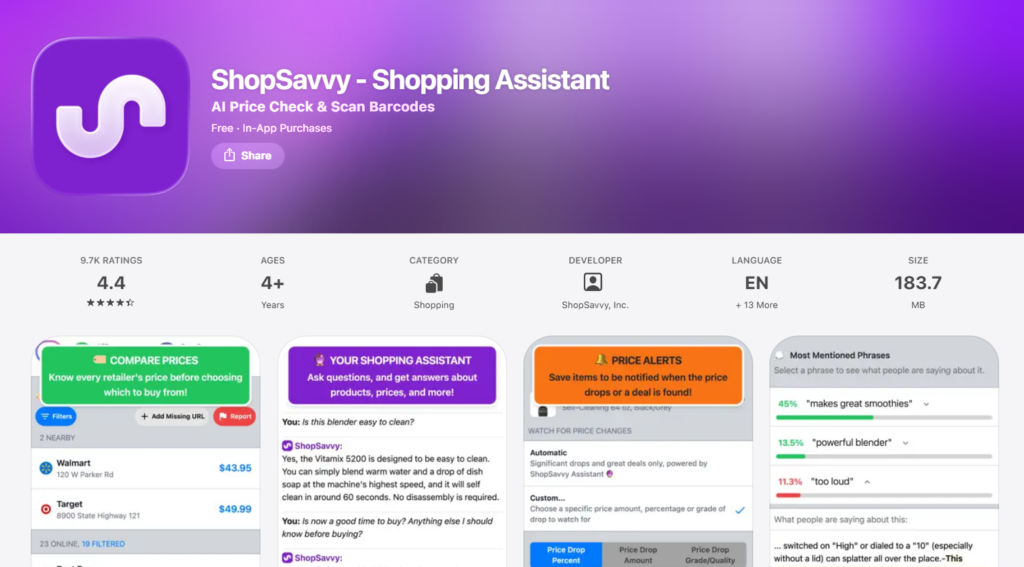
ShopSavvy lets you scan barcodes to compare prices across online and local retailers on the spot. The app shows you where to buy specific items for less, including at places like Amazon. It’s awesome for packaged goods and non-perishables, but not so much for fresh produce without barcodes.
Price Cruncher focuses on unit price comparison. It helps you figure out if the larger size actually saves money per ounce or pound.
Sometimes, bigger isn’t better. The app calculates cost per unit so you can compare sizes and brands easily.
Neither app offers the whole-list comparison that makes Basket stand out. ShopSavvy is perfect for single-item price checks when you’re standing in the aisle, debating a buy. Price Cruncher keeps you from assuming bulk sizes are always cheaper—they’re not.
Use ShopSavvy for big-ticket groceries like coffee, olive oil, or specialty ingredients where prices can swing by $5-10 per item. Use Price Cruncher when you’re choosing between package sizes to make sure you’re actually getting the best deal per ounce, not just the lowest sticker price.
User Experience and Common Challenges

Basket works well for basic price comparisons. Still, the app has some quirks with product matching and store coverage that can mess with your expected savings. How much this matters depends on whether you’re willing to double-check substitutions and verify prices before you check out.
Ease of Use and App Design

Basket’s layout is simple—core tabs for Search & Compare, your shopping list, and Sales & Coupons. You can scan barcodes to add items straight from your pantry, which saves you from typing everything out. The scan feature works well for most big brands but sometimes stumbles on store-specific barcodes, especially from places like Aldi.
Navigation gets a little clunky when you dig deeper. Finding features or toggling settings takes extra taps that aren’t always obvious. For example, if you want to report prices, you have to go into Account Details instead of seeing a main menu option.
When you’re ready to shop, tapping “I’m Ready to Shop” turns your list into a checkable format. The app then asks you to confirm if the listed prices match what you saw in the store, which helps everyone else get better data. This only works if enough people in your area pitch in.
Accuracy of Price Data
Price accuracy really depends on how recently someone updated your local store’s info. Sometimes, you’ll see a store ranked cheapest based on stale sale prices or wrong regular pricing. The app tries to account for current promos, but gaps show up when deals expire or new discounts aren’t logged.
Product substitutions can be a headache. Basket automatically swaps name-brand items for generics when a store doesn’t carry your pick.
For example, a 12-pack of La Croix might get replaced with a single can of Bubly at Dollar General, showing a total of $0.50 instead of a fair 12-pack price. At Costco, you might see your item matched against a 36-pack instead of 12, which inflates the price comparison.
Always tap “Change” under substituted items to see what the app actually matched. Double-check package sizes and quantities before trusting the total. It’s a little extra work, but it saves you from making a wasted trip.
Store Availability Limitations

Basket covers major grocery chains, big-box stores like Walmart and Target, and some dollar stores within a 5-mile radius. Small independents, ethnic markets, and co-ops rarely show up. If you shop at niche stores for specialty ingredients or better produce, the app won’t help you compare those prices.
Store coverage varies a lot by region. Urban areas usually have more participating stores and fresher data, while rural users might see just two or three stores listed with old price updates. You can enter a ZIP code manually if you want to check prices for a different area before making a drive.
The app doesn’t integrate online grocery pickup or delivery prices right now, so it’s just for in-store comparisons. If you rely on curbside shopping, you’ll need to check if those prices match what’s in the retailer’s own app or website.
See Related: Frugal Living Tips: How to Save Money and Achieve Financial Independence
Frequently Asked Questions

Grocery price comparison apps like Basket help you save real money by showing which stores offer the lowest prices on your shopping list. They track unadvertised sales and alert you to price drops before you buy.
What are the key advantages of using a grocery price comparison app to help with budgeting?
You get instant visibility into where your grocery dollars go furthest. Price differences between stores can hit 30 to 40 percent on the same items in the same week. That means a $150 grocery budget at one store might only cost you $100 at another.
You’ll save time, too. Instead of driving all over or checking a bunch of websites, you see all the prices in one spot before you even leave home. Unadvertised sales pop up, so you catch deals other shoppers miss.
These apps let you track your spending over time. When you see exactly what you pay for staples like milk, eggs, or coffee week after week, you start making smarter decisions about when to stock up and which store brands are the best value.
How has the Basket app improved the grocery shopping experience for users?
Basket takes away the guesswork by showing total cart costs at each nearby store before you shop. You build your list once, and the app instantly calculates what you’d pay at Walmart, Target, Kroger, or wherever you like to shop.
You’ll see deals you wouldn’t find otherwise. Store circulars miss plenty of price drops, but Basket tracks these changes and shows you coupons for items already on your list. People say they save time by knowing exactly which store has everything they need, instead of making multiple trips.
Your shopping list syncs across devices. You can plan at home and access it from your phone in the parking lot. The app works for both in-store shopping and online grocery orders, so you can compare delivery fees and convenience charges against the time cost of shopping yourself.
Are there any grocery price comparison apps that excel in both user-friendliness and accuracy of pricing?
Basket stands out for its easy interface and reliable price data. You don’t have to scan barcodes or enter prices by hand. The app pulls current pricing from store databases and updates regularly to reflect new sales.
The search works well for finding specific products or browsing categories. You see product images next to prices, so it’s easy to make sure you’re comparing the right items. The layout keeps things simple but still shows you what you need to decide.
Price accuracy depends on how often stores update their data feeds. Most users say Basket’s prices match what they pay at checkout, though sometimes there are hiccups with clearance items or regional promos. Double-checking prices on big-ticket items gives you peace of mind and still saves you a lot of time.
How can grocery price comparison apps help with adhering to the 5 4 3 2 1 shopping rule?
The 5 4 3 2 1 rule says: buy five vegetables, four fruits, three proteins, two sauces or spreads, and one treat per shopping trip. Price comparison apps help you stick to this plan without overspending by showing which stores offer the best prices in each category.
You can build your list with this rule, then instantly see if your produce budget stretches further at a farmers market chain or a big-box store. Proteins often swing the most in price between retailers. One week, chicken breast could be $3.99 at one store and $6.99 at another.
The apps keep you from ditching the rule when a store is out of something. If your go-to store is out of a veggie you need, you’ll know right away if it’s worth substituting or making a quick stop elsewhere. It keeps you focused on balanced shopping instead of just grabbing whatever’s convenient.
Which specific features should I look for in a price comparison app to manage my grocery budget effectively?
Check store coverage in your area first. An app that tracks Whole Foods and Safeway isn’t much help if you live near Aldi and Food Lion. See which retailers the app actually monitors before you spend time building lists.
Look for total cart calculation, not just individual item prices. You want to know what your entire trip will cost at each store, not just whether bananas are cheaper at Store A. Don’t forget to factor in gas money and time if the app shows a store 15 minutes farther away saves you $8.
Price history and alerts help you time your purchases. If you notice coffee drops to $6 every three weeks, you’ll know to stock up then instead of paying $9. Sharing your shopping list is handy if multiple people in your household shop, so you avoid duplicate buys and missed items.
Can you recommend a grocery price comparison app that consistently offers updated and reliable pricing across various stores?
Basket usually delivers up-to-date pricing for most big grocery chains. It updates often enough to catch those weekly sales cycles, which is pretty handy. The app covers both national retailers and some regional chains, but honestly, coverage depends a lot on where you live.
You’ll probably get the most out of it if you shop at regular supermarkets. Specialty stores or ethnic markets? Yeah, those usually don’t show up in the app’s pricing databases. If you stick with it, Basket picks up on your habits and starts suggesting better deals on the stuff you buy all the time.
Just download Basket and give it a shot for a few shopping trips—maybe three or four. Pay attention to whether the prices actually match your receipts. Also, ask yourself if the time you save feels worth it, even if there are small price differences here and there.
A lot of people say they end up saving enough to make it worthwhile. Still, it really depends on how much prices jump around at the stores near you.
Leave a Reply